Learning how to update old blog posts for SEO can be one of the fastest ways to grow your blog traffic. You don’t always need to write brand new content.

To update an old blog post, start by picking posts with good ranking potential, then do fresh keyword research. From there, refresh or rewrite the content and then republish.
I’ve been writing blog articles for my own site and for clients since 2019. I’ve helped over 200 brands improve their blog strategy and grow their organic traffic. Below, I’ll walk you through my 8-step process for updating blog posts, plus answer common questions.
Why update old blog posts for SEO?
SEO blogging used to prioritize publishing as many new articles as possible. Now updating old blog posts can be just as effective, and sometimes even more so.
Google wants to show searchers current, accurate content. AI tools like ChatGPT and Google’s AI Overviews also favor clear, well-organized pages.
When HubSpot updated its old posts, monthly organic search views increased by an average of 106%.
Step 1: Decide Which Articles to Update
Start by choosing which posts to update first. Some articles have more potential than others. Here’s how to spot the ones with the best opportunities for SEO and conversions:
Posts related to your current goals - Your offers and audience may have changed since you wrote certain posts. Pick articles with topics connected to what you currently offer. For example, a photographer who now focuses on weddings should update wedding posts over family session posts.
Posts with keywords people search for - Some topics have more search demand than others. For example, a therapist’s post on how couples can improve their relationship has more ranking potential than one about how she started her practice.
Posts getting impressions from Google - Impressions are the number of times your post showed up in search results. Posts with impressions are already on Google’s radar, so they’re often easier to boost. To see this, go to Google Search Console > Performance > Pages tab.
Posts ranking on page two - These posts have potential to reach page one with a refresh. In Google Search Console, go to Performance and click “Average position.” Then check the Pages tab for posts ranking around 11 to 20.
Topics your audience asks about - Update blog posts that are related to questions clients, customers, or prospects ask.
Posts with outdated info - Old stats, past years in the title, or tools that no longer exist can negatively impact SEO and need to be updated.
Posts losing traffic - Compare date ranges in Google Search Console to find posts with traffic dropping.
Step 2: Make a List and Prioritize Your Posts
Once you have a few options, write them down in one place. Rank them by which ones have the best chance of bringing in more traffic. Then decide how to balance updates with new content. If you have lots of older posts getting impressions, focus on updates for a while. If your blog is newer or missing key topics, try a mix of both.
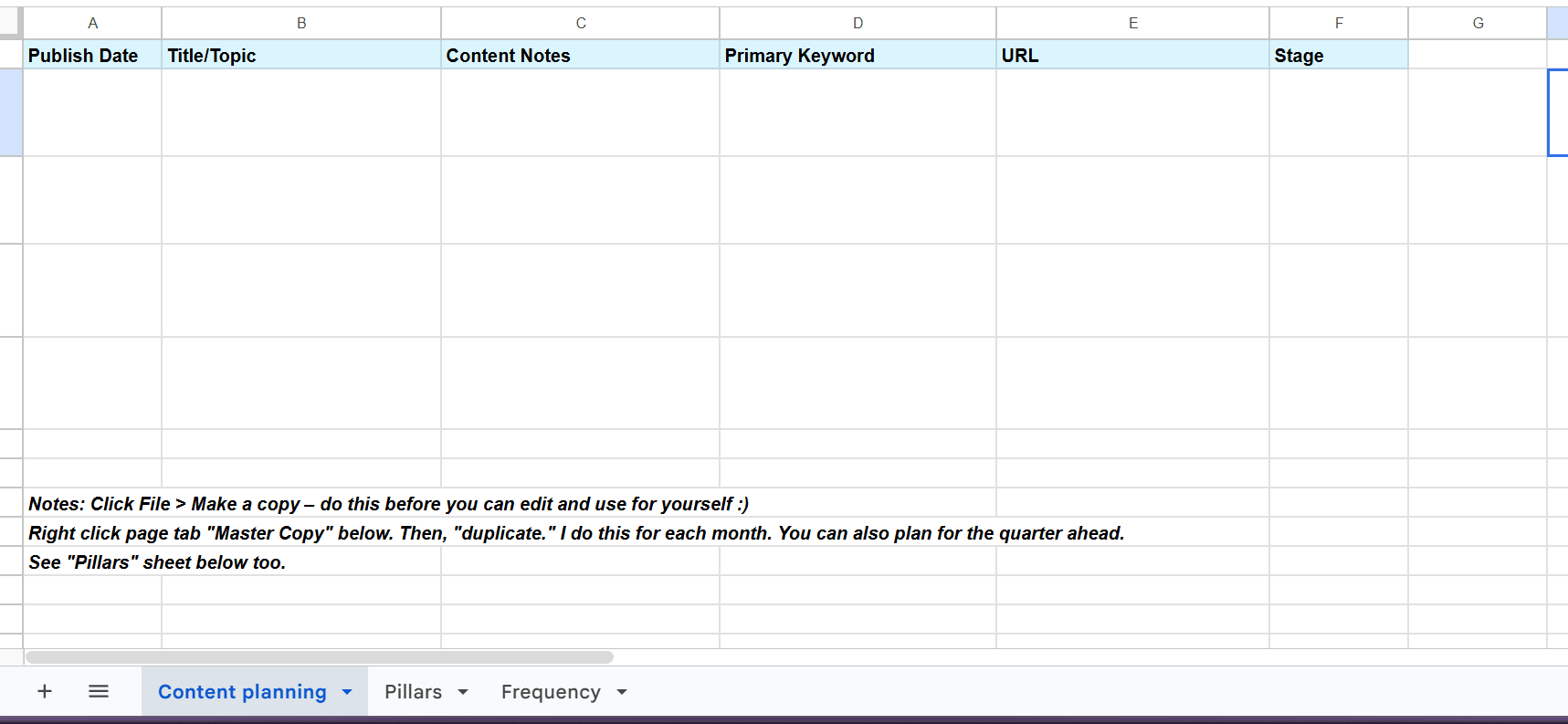
A content planning spreadsheet can help you stay organized. The template in my SEO blogging course includes a column for marking each article as new or updated.
Step 3: Do Keyword Research for Each Post
Keyword research shows you the exact phrases your readers type into Google. Your old post might target a phrase nobody searches for, or no keyword at all. Fresh research helps you pick the best phrase to target now.
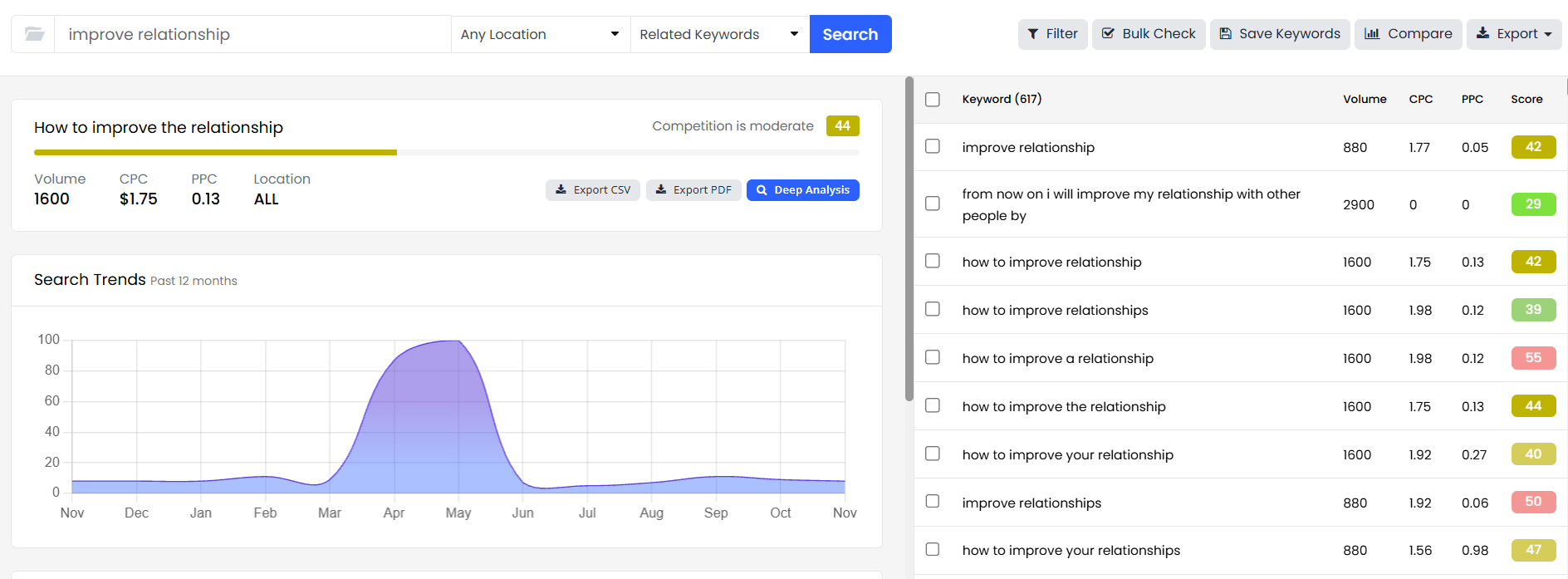
My favorite tool is KeySearch. You can try it free for a week, and use code KSDISC for 20% off if you subscribe. Start with a broad search related to your post. For example, a therapist might search “improve relationship.”
Here are a few tips for choosing your keywords:
Look for higher volume and a lower score - Volume shows how many people search a phrase each month. In Keysearch, a lower score means less competition, meaning the phrase is easier to rank for.
Pick one primary keyword - This is the main phrase your post targets. Use it in your title, intro, and a few headers.
Add secondary keywords - Similar phrases can be sprinkled in once or twice each.
Consider long-tail keywords - These are longer, more specific phrases, and they’re often easier to rank for.
Step 4: Choose Between Minor Updates or a Full Rewrite
Deciding how much work each post needs depends on how well it performs now.
If a post is getting some traction, a few minor updates may be enough. Refresh old stats, add a new section, or reword your headers. You can also add internal links, new images, or an FAQ section. Small changes like these can push a page two post onto page one.
If a post isn’t ranking or there’s little content, a full rewrite is often a better choice. I like to start in a fresh Google Doc and create a new outline. Then I write the updated article, using the old one as a reference, reusing any relevant content.
Step 5: Update Your Content for Google and AI Search
Whether you’re making small edits or rewriting from scratch, these updates help your post rank on Google and show up in AI tools.
Answer the main question up front - Share a clear, short answer to the query or keyword phrase in your intro. Google and AI tools often pull these summaries into their results.
Refresh stats, sources, and examples - Replace outdated numbers with more recent ones and link to the source. Swap vague examples for specific, relevant ones.
Add personal experience and expert insights - Share what you’ve seen firsthand or quote a trusted expert. This helps your article stand out from generic content.
Update headers and keyword placement - Add your primary keyword to the title, intro, and a few headers. Write headers clear enough for skimmers to follow.
Add new images and alt text - Include relevant photos, graphics, or screenshots. Write descriptive alt text and give image files clear, keyword-friendly names. For example, rename your image to “improve-relationship-couple-talking.jpg.” Then use alt text like “Couple talking on a couch about how to improve their relationship.”
Fix broken links and add internal links - Replace links to pages that no longer work. Link to newer posts on your site, and link back to this post from related articles.
Add an FAQ section - Answer 3 to 5 questions people search for about your topic. Keep each answer short and direct so Google and AI tools can easily pull it into their results.
Rewrite your meta title and description - Include your primary keyword in both. Aim for about 55 characters for the title and 155 for the description so it all fits on Google’s search results page.
Step 6: Publish Your Updates on the Original Post
After you update an old blog post for SEO, don’t publish it as a new article. Open your original post, switch it to draft, add your new content, and republish it.
Here’s what to know before you hit publish:
Keep the same URL when you can - Your URL may already have backlinks and ranking history. Changing it can reset that progress. Only change it if the current URL no longer matches your topic.
Set up a redirect if you change the URL - A redirect automatically sends visitors from an old URL to a new one. Use a 301 redirect to tell Google the move is permanent and keep old links from leading to a broken page. For example, your redirect might look like this: /couples-tips -> /how-to-improve-relationship 301
Update the date after big changes - If you rewrote the post or made major updates, republish it with today’s date. A current date shows Google and readers that your info is up to date.
Leave the date alone for small edits - Changing the date after a minor tweak won’t help your rankings. Google’s team has said dates should change only with significant updates.
Step 7: Request Indexing in Google Search Console
After hitting publish on your updated article, request indexing to Google to recrawl your post. Otherwise, Google may take longer to notice your changes. Open Google Search Console and paste your post’s URL into the “Inspect any URL” bar at the top. Then click “Request Indexing.”
Depending on how old or new your site is, indexing may take up to a week or two. Requesting it more than once won’t speed things up. Submit your request once, then check back later.

Step 8: Promote Your Updated Post
Instead of waiting for Google and AI tools to do all the work, promote your updated post for even more attention.
Here are a few ways to share it:
Social media - Post about the article on Instagram, Facebook, LinkedIn, or wherever your audience spends time.
Email list - Send the post to your subscribers, especially after a full rewrite. I share a monthly blog roundup with my email newsletter, so this is also a great option for more visibility.
Pinterest - Create new pins with fresh graphics and link them to the post.
Online communities - Share it in Facebook groups or forums where your target audience asks related questions.
How to Update Old Blog Posts for SEO: FAQs
How often should you update old blog posts?
Review your most important posts at least once a year. Posts with stats, tools, or yearly info may need updates more often. Check Google Search Console every few months to spot posts losing traffic, and update those first.
Does updating old blog posts help SEO?
Yes, updating old blog posts can help them rank higher and bring in more traffic. Google’s ranking systems favor helpful, reliable content. HubSpot saw an average 106% increase in monthly organic search views after updating old posts. Updates can also help your content show up in Google’s AI Overviews, which follow the same SEO best practices.
Will updating a blog post hurt my rankings?
Updating a post usually won’t hurt rankings. However, it can sometimes cause a temporary dip while Google recrawls and reevaluates your page. To lower this risk, keep keywords the post already ranks for and redirect any changed URLs. Check your post’s current keywords in Google Search Console before making big changes.
Should I delete old blog posts or update them?
Update posts covering topics your audience still searches for. Consider deleting posts that are outdated, off-topic, or repeat another article you have. If you delete a post, redirect its URL to a related article. This sends visitors and any backlinks to a helpful page instead of an error page.
How long does it take for an updated blog post to rank?
Most updated posts see changes within a few weeks to a few months. Google can take up to a couple of weeks to recrawl the page. Posts already getting impressions often improve faster. Give it time before making more changes.
How to Update Old Blog Posts for SEO: Next Steps
Updating old blog posts is one of the most effective ways to grow your traffic. Start by picking posts with the best SEO opportunities. Then research keywords, update your content, and republish on the original URL. Finish by requesting indexing and promoting your post.
Want even more guidance for blog success? My SEO blogging course includes a full lesson and checklist for updating old blog posts. It also covers keyword research, Google Search Console, and writing for AI search.
If you’d rather have personalized help, reach out to chat about full blogging support.